DEP – Cohort 3
Receiving Revenue: Creating a Payment Request
When the DAO is about to be paid — for a service or a product — the Order Handler for that order creates a Payment Request. This gives the customer a clean way to pay, and it lets the framework record the revenue correctly from the start.
Sponsorship of the project houses and Local events does not come in this way. It follows the Kambria Circles Docs model: Kambria agrees the terms with the sponsor and sends invoices outside the Circles website, in normal currency (fiat), and the money goes to the project. The Circles DAO finds and looks after sponsors. Kambria keeps a fixed fee of 15% of each sponsorshipKambria keeps a fixed fee of each sponsorship, whoever brought the sponsor in, and the rest (85%) goes to the project. If the Circles DAO broughtand the rest goes to the project. If the Circles DAO brought the sponsor in, Kambria pays the DAO a referral fee of 5% of the sponsorship, in USDT, out ofKambria pays the DAO a referral fee in USDT out of its own fee; the sponsor pays nothing extra, and the referral fee is DAO revenue, split through the framework. For a large sponsorship, the referral fee may be capped (for example at 250 USDT per sponsor), or Kambria's fee lowered for amounts above $5,000. This is sponsorship with brand recognition, not a donation, and the referral fee comes out of Kambria's fee, never out of the project's share — so the project receives the same amount whoever brought the sponsor in.and the referral fee is DAO revenue, split through the framework.
To create a payment request:
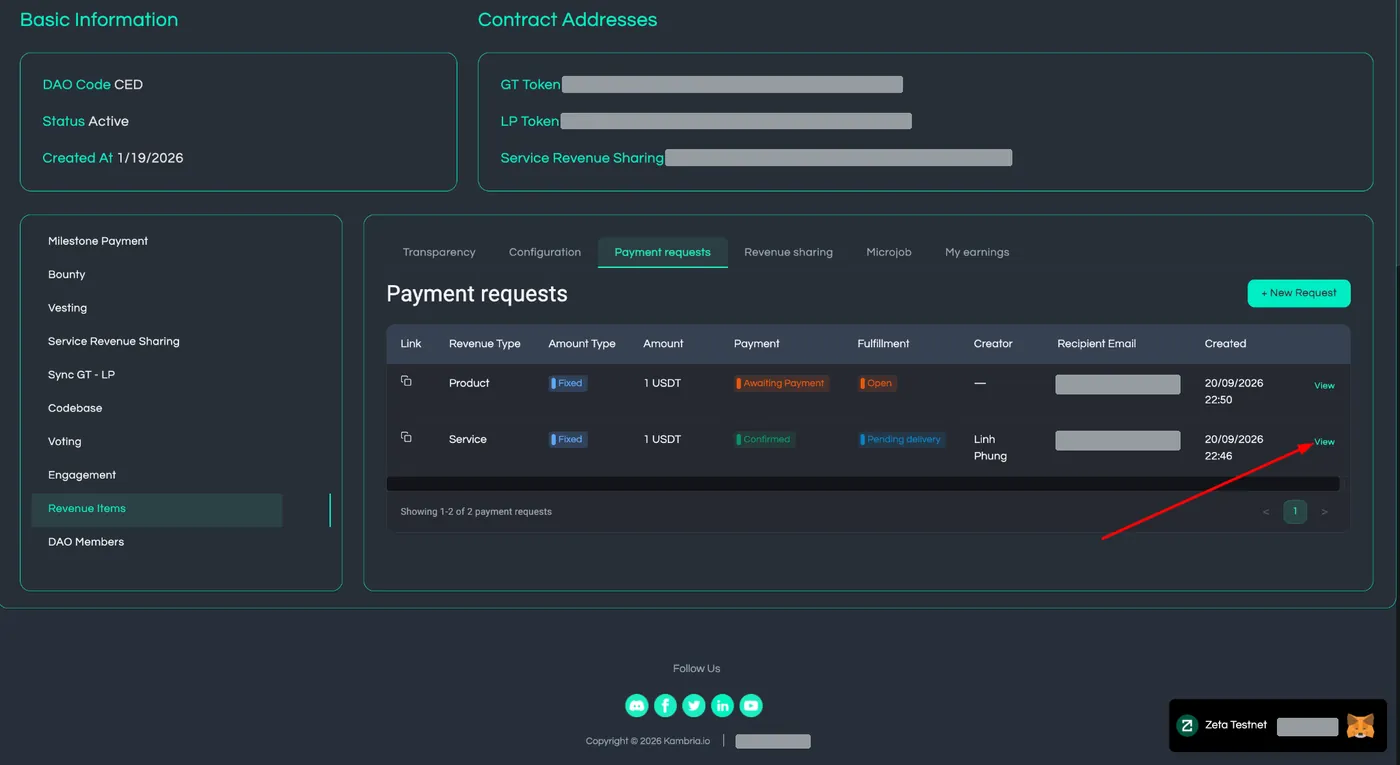
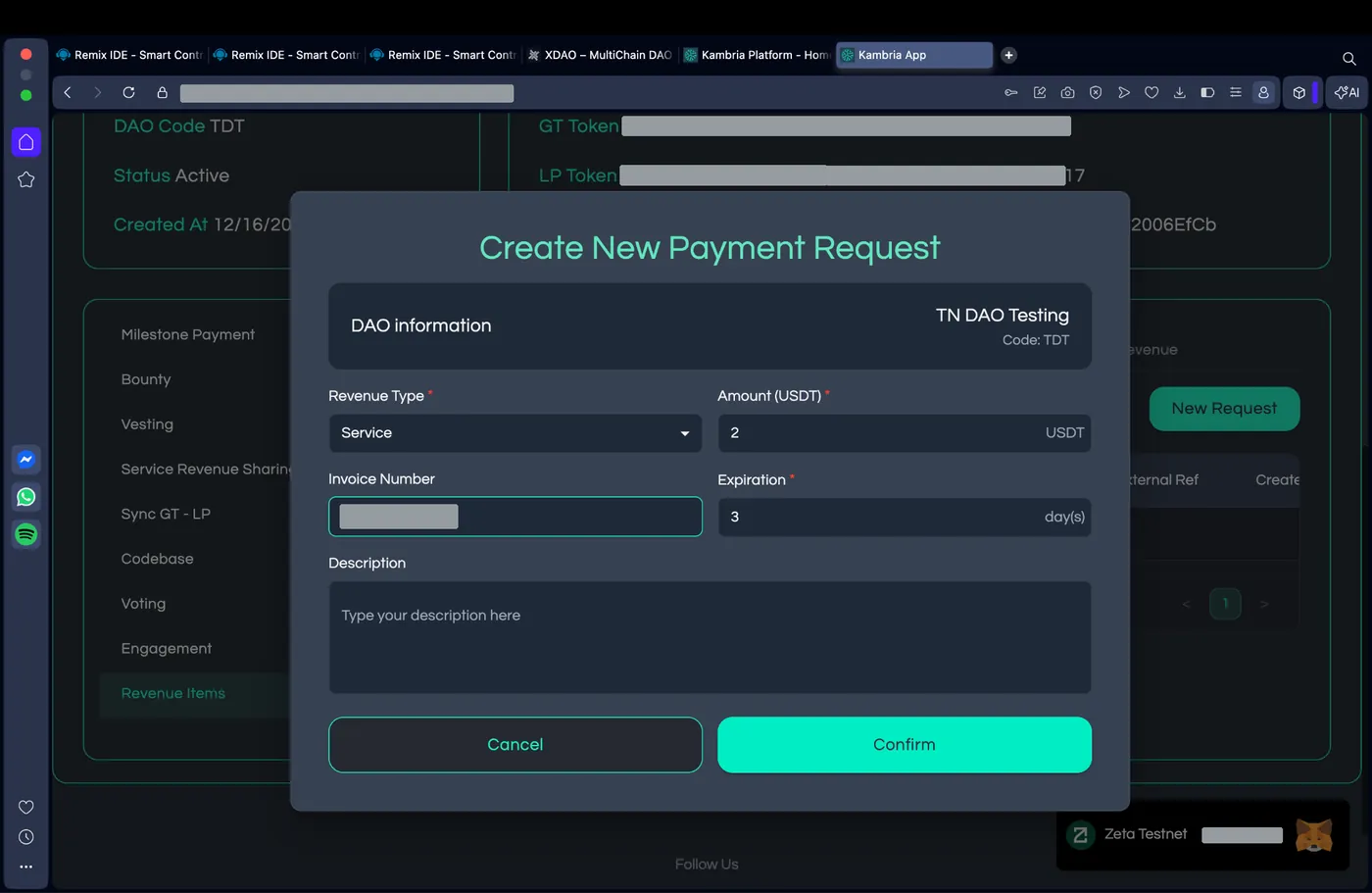
In the DAO's Revenue Items, open the Payment requests tab and click + New Request. The DAO is already selected.
Choose the Revenue Type / Category (for example, Service or Product) — see Categorisation & Revenue Split for what these are for.
Enter the Amount in USDT.
Add a short Description — the invoice or order text, so the payment is recognisable later. Add an Invoice Number if you have one.
- Enter the customer's email and how long the link stays valid. The customer signs in with that email to pay.
Create the request. The framework produces a payment request page containing:
- the DAO's Revenue Vault address,
- the amount and token (USDT on Polygon),
- a human-readable reference,
- and a Connect wallet & pay option for the customer.
Share the request's payment link with the customer, by copying it or sending it by email from the app.
If more than one member worked the order, the Order Handler who created it can add co-handlers — the people who will share that order's Order Handler revenue (see Order Handler Revenue Sharing) before the order is marked completed.
The customer then pays by sending USDT to the vault address shown on the request page.
A payment request moves through clear states, so everyone can see where it is:
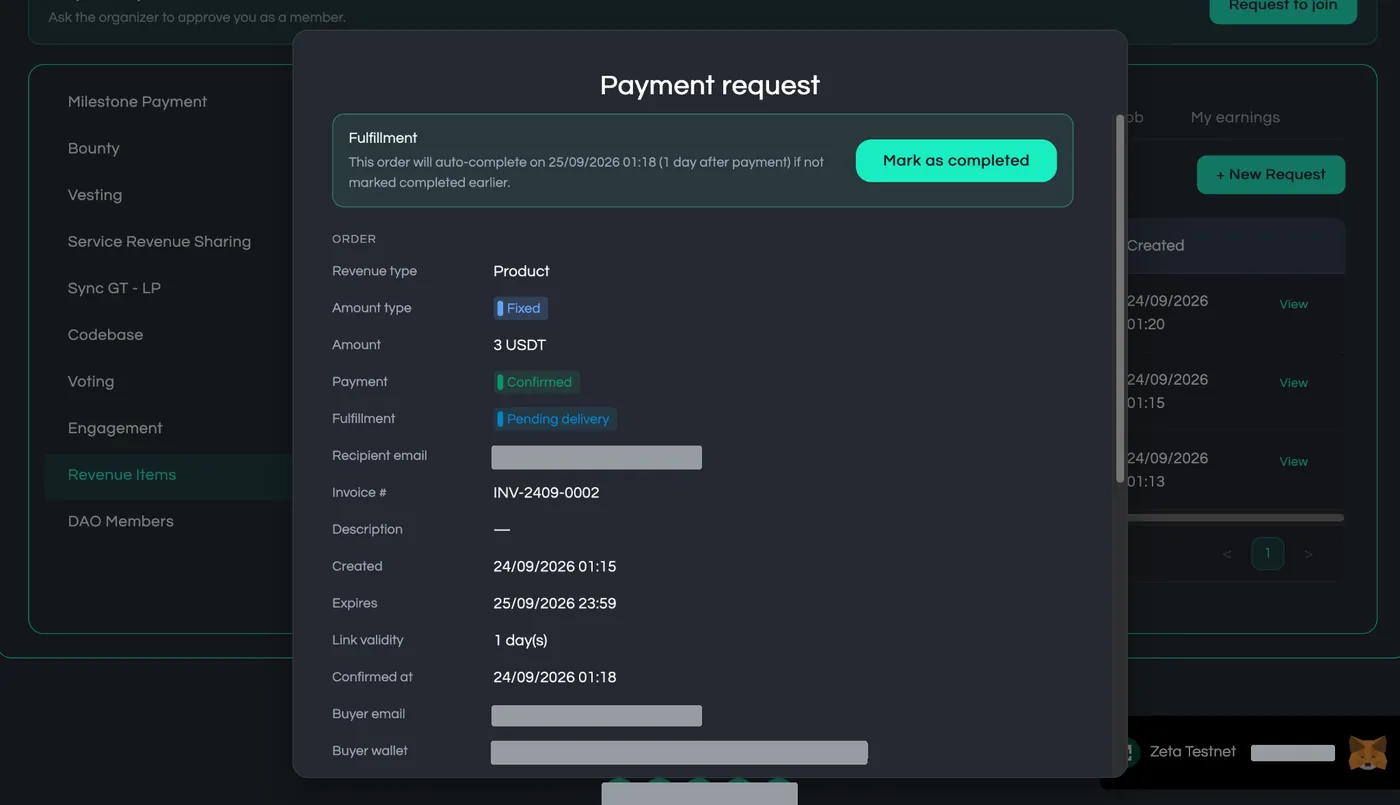
Payment: Awaiting payment → Confirmed. Order: Open → Pending delivery → Completed
Confirming what comes in
When the customer pays through the payment link, the framework checks the payment against the request automatically:
- If it matches, the payment is recorded straight away as a confirmed revenue item and is ready to be included in a cycle.
- If it doesn't match, the payment isn't recorded and the request stays Awaiting payment. A request for a fixed amount needs that exact amount. A request where the buyer chooses the amount accepts anything from 1 USDT. Each request can be paid only once.
Only valid payments are recorded, so the revenue the framework splits is always revenue that matched a request.
Completing the order is a separate step, about delivery rather than payment. Once the DAO has delivered, the Order Handler marks the order completed. An Organizer can also mark it completed. If no one does, the order completes automatically a set number of days after payment (for example, 60 days). The DAO can change this period in its configuration, or set it to 0 to turn automatic completion off.
Payments made through the payment link always match their request. If someone sends USDT to the Vault outside the link, or a different amount, the money arrives but isn’t recorded as revenue. The Operator spots it when checking the Vault against the Revenue Ledger at the cycle’s close, and the DAO refunds it to the sender by treasury vote, then shares the payment link again.